
Quick Verdict
For photorealistic cinematic production, Sora 2 leads the field in 2026. Runway Gen-4 is the top choice for commercial work requiring precise camera and character control. CapCut and Opus Clip deliver the best social ROI for short-form content and viral clip extraction. Descript remains unmatched for podcast and interview editing, cutting production time by up to 80%. Choose based on your content type, not hype.
If you are a YouTuber trying to keep up with the pace of content creation in 2026, you already know one thing: editing is the bottleneck. It always has been. But this year, the gap between creators who use AI tools and those who don’t has become impossible to ignore.
This guide breaks down the best AI video tools for YouTube creators, organised by what you are actually trying to do; whether that’s building a cinematic production pipeline, fixing technical pain points, dominating YouTube Shorts, or future-proofing your channel strategy.
Table of Contents
Best AI Video Tools for YouTube Creators in 2026
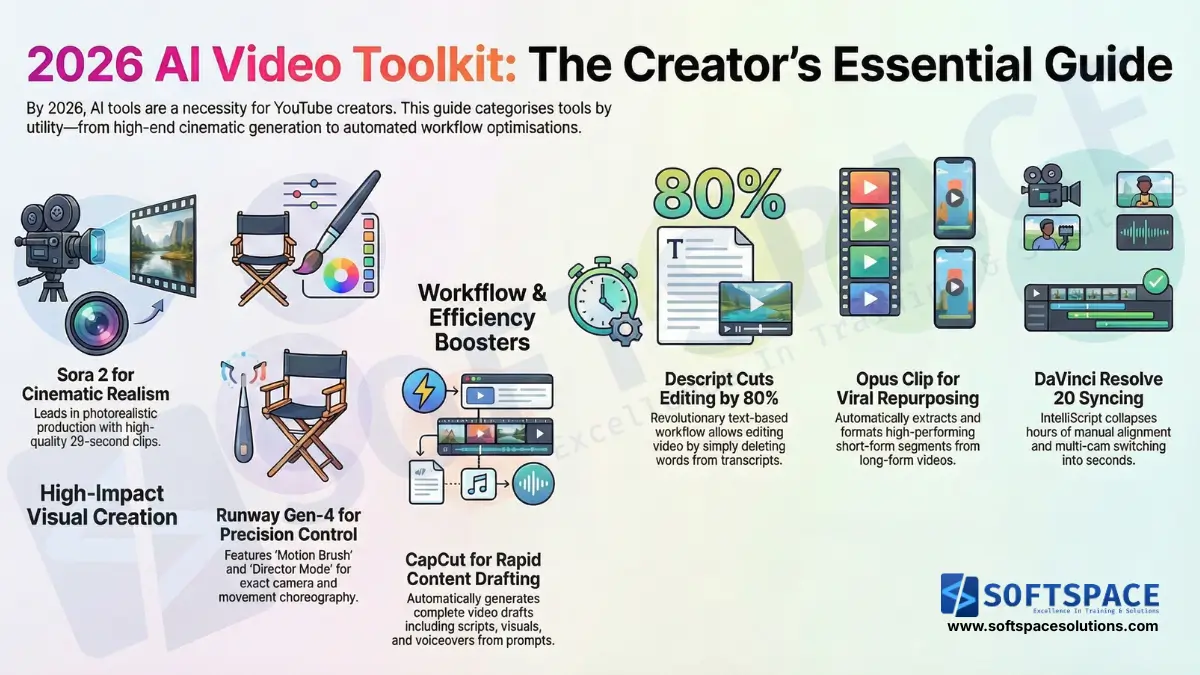
These tools are for creators who are ready to invest seriously in their production pipeline. They go beyond basic automation and give you genuine creative control over how your content looks and feels.
DomoAI: The All-in-One Creative Studio
DomoAI sits at an interesting intersection between artistic flexibility and narrative control. Its standout feature is Frames to Video, which lets you use between 2 and 8 keyframes as fixed anchor points in your timeline. This means you decide the key visual moments in your story, and the AI fills in the transitions coherently.
The tool ships with over 50 unique visual styles, including Ghibli-inspired animation and realistic cinematic footage. For creators who want a consistent visual identity across episodes or series, DomoAI’s style locking is a practical advantage. It also includes 4K upscaling, which makes older footage usable in a high-resolution context without expensive re-shooting.
If your channel leans toward animated explainers, stylised travel content, or story-driven shorts, DomoAI is worth a serious look.
Runway Gen-4: The Professional’s Precision Toolkit
Runway Gen-4 is built for creators who want precision, not just speed. Two features set it apart from the competition in 2026.
The first is Motion Brush, which lets you paint movement directly onto objects in a scene. You define exactly which element moves and in what direction, rather than letting the AI guess. The second is Director Mode, which allows you to choreograph camera paths as if you were directing a real shoot. You can specify dolly moves, pan directions, and arc movements.
For brand deals, product showcases, or any video where inconsistency across scenes would look unprofessional, Gen-4’s character consistency engine is genuinely useful. It maintains the same face, clothing, and overall aesthetic across multiple generated clips, which was a real weakness of earlier AI video tools.
CapCut: The All-in-One AI Video Maker
CapCut has evolved well beyond its origins as a simple mobile editor. In 2026, its AI Video Maker tab can take a plain text prompt and return a complete video draft with script, visuals, and voiceover. For creators who batch-produce content or need to move fast on trending topics, this is a meaningful time saver.
Two newer features stand out. AI Relight lets you adjust or completely recreate the lighting environment in a video after it has been recorded, which opens up creative corrections that used to require a full reshoot or professional colour grading software.
AI Video Translation with lip-sync can localise your content into multiple languages with synchronised mouth movement, making international distribution genuinely practical for solo creators.
You can read more about how AI is reshaping content creation workflows in our piece on the impact of AI on digital marketing in 2026.
AI Tools That Fix Common Editing Bottlenecks
Not every problem is about making better visuals. Sometimes the problem is that your audio sounds terrible, your clips are slightly too short, or your editing workflow eats 10 hours a week. These tools address those specific pain points.
Adobe Premiere Pro: AI-Powered NLE Enhancements
Adobe Premiere Pro remains the industry standard non-linear editor, and its AI integrations in 2026 have made the most frustrating parts of the job much faster.
Generative Extend is one of the most practical additions. It uses AI to add up to 2 seconds of extra footage to the beginning or end of a clip, which solves a problem every editor has encountered: a clip that is just barely too short for the cut you want. The result blends naturally with the original footage in most cases.
Enhance Speech delivers high-quality noise reduction that goes beyond what traditional audio filters could manage. Background hum, room reverb, and wind noise are handled automatically. Audio Remix rounds this out by intelligently resizing background music tracks to match your edit length, avoiding the awkward fade-out that plagues so many YouTube videos.
DaVinci Resolve 20: The Neural Engine Revolution
DaVinci Resolve has long been the go-to for professional colourists, but version 20 makes a strong case for editors and podcasters as well.
IntelliScript is the headline feature. It takes transcribed audio and aligns it to an existing script, then automatically builds a timeline from that alignment. For interview-based channels, documentary content, or creators who script their videos in advance, this collapses hours of manual sync work into seconds.
Multicam SmartSwitch uses speaker detection to automatically cut between camera angles in multi-camera setups. The editor becomes a supervisor rather than a manual switcher, which matters for channels that film panels, interviews, or live-style content.
DaVinci Resolve 20’s free tier remains one of the most generous in professional software, making it accessible even for creators who aren’t ready to commit to a paid plan.
Descript: Revolutionary Text-Based Editing
Descript remains the most intuitive tool for podcasters and talking-head YouTubers. The core workflow is simple: Descript transcribes your video, and you edit the video by editing the text. Delete a sentence from the transcript, and the corresponding video clip disappears from the timeline.
Underlord, Descript’s AI co-editor, takes this further by automatically identifying and batch-removing filler words like ‘um,’ ‘uh,’ and ‘you know,’ as well as extended silences. For creators who speak conversationally or conduct long interviews, the time savings are substantial.
Descript reports that its text-based workflow can reduce editing time by around 80% for talking-head content, which is a meaningful number for solo creators with limited hours.
Dominating YouTube Shorts and Viral Content
Short-form video continues to drive channel growth in 2026. The tools in this section are built specifically for repurposing long content and creating platform-native clips that perform.
Opus Clip: The Short-Form Specialist
Opus Clip has become the standard tool for long-form-to-short-form repurposing. Its ClipAnything feature analyses full-length videos, including vlogs, interviews, podcasts, and tutorials, and automatically extracts the segments most likely to perform well as short-form clips.
It scores clips based on engagement signals, formats them for vertical display, adds captions, and packages them for direct upload to YouTube Shorts, TikTok, and Instagram Reels. For creators with hours of existing content sitting in a backlog, Opus Clip can turn that library into a consistent short-form presence with relatively little manual effort.
Understanding how to use these tools effectively connects directly to a broader social media marketing strategy for content creators, which is increasingly inseparable from YouTube growth in 2026.
Google Veo 3 Fast: The YouTube-Native Advantage
Veo 3 Fast is integrated directly into YouTube Shorts, which gives it a distinct advantage for creators who live inside the YouTube ecosystem. Using simple text-to-video prompts, you can generate clips up to 8 seconds long at 480p resolution, entirely free.
The quality is not cinematic, but for B-roll, visual illustrations of a point, or quick concept clips to support a script, it is genuinely useful. The direct integration also means there is no export-import friction, which matters when you are trying to publish quickly during a trending moment.
For creators experimenting with how to make AI videos without a large budget, Veo 3 Fast is the most accessible entry point available right now.
Captions.ai: Mobile-First Global Reach
Captions.ai targets mobile-first creators who want to reach global audiences. Its core feature is AI-generated subtitles that are accurate, well-timed, and visually styled for short-form video.
The more significant capability is voice translation into 28-plus languages with synchronised lip movement. Your video can be localised so that your mouth appears to match the translated language, rather than showing an obvious dub. For channels targeting international growth, this removes one of the biggest barriers to non-English audiences. It also connects to a broader pattern of AI applications transforming social media distribution that are changing how creators think about reach.
Future-Proofing Your Channel with AI Trends
Beyond the tools you use today, there are several trends shaping what AI video production will look like over the next two to three years. Understanding them now puts you ahead of the curve.
Sora 2 vs. Pika 2.5: Realism vs. Speed
These two tools represent two different philosophies for AI video generation, and the right choice depends on what you actually need.
Sora 2 (OpenAI) sits at the top of the realism category. It can generate up to 25 seconds of photorealistic footage per clip. Pricing sits at approximately $200 per month for the generation volume most professional creators need. The output quality is suited to cinematic VFX work, high-end brand collaborations, or premium YouTube content where the visual bar is high.
Pika 2.5 trades some of that realism for speed and affordability. It can generate clips up to 90 seconds long, making it better suited to rapid prototyping, testing multiple visual directions, or producing content at volume. Plans range from $8 to $28 per month, which puts it within reach of independent creators.
The best AI Video Tools for YouTube Creators is Pika 2.5, which will be the practical daily driver, and Sora 2 will be reserved for specific high-production moments.
The Rise of AI Avatars: HeyGen and Noiz.ai
AI avatars are shifting from a novelty to a practical production tool for certain types of channels.
HeyGen’s Avatar IV now includes full-body motion and natural gesture synthesis, not just a talking head. The result is a digital presenter that can deliver scripted content, product explanations, or training videos without a camera setup. For creators in educational, explainer, or business niches, this reduces the production overhead significantly.
Paired with Noiz.ai for voice cloning and multilingual dubbing, the combination allows a single creator to maintain a presence in multiple languages with consistent vocal branding. Noiz.ai’s expressive voice cloning goes further than basic text-to-speech by preserving emotional tone and pacing, which matters for audiences who respond to how something is said as much as what is said.
This directly connects to broader questions about AI’s impact on employment and creative industries, particularly around on-screen talent and voice work.
The Physics Barrier: The Honest Limitation of 2026 AI Video
It is worth being direct about where current AI video generation still falls short, because understanding the limitations helps you deploy these tools more effectively.
Most leading models can produce 4K visuals that look genuinely impressive in static or slow-moving scenes. Where they consistently struggle is physics simulation: water flowing, cloth moving naturally, objects falling under gravity, and liquid interacting with surfaces. The outputs in these scenarios often look plausible at first glance but break down on closer inspection.
This is not a hardware limitation or a dataset problem that will be solved next quarter. It reflects a deeper challenge in how current diffusion models represent physical causality. For creators producing content that requires believable natural motion, traditional VFX pipelines or practical footage remain necessary.
Staying aware of this boundary and compositing AI-generated elements with real footage in scenes that require physics accuracy is the most practical approach for 2026.
Final Comparison: Choosing the Right AI Video Tool by Use Case
Matching a tool to your actual workflow and budget is more important than chasing the highest-spec option. Here is a practical breakdown based on content type.
| Content Type | Best Tool | Core Advantage |
| Cinematic / VFX | Sora 2 | Best-in-class photorealism for premium content |
| Commercial / Brand Deals | Runway Gen-4 | Precise camera control and character consistency |
| Short-Form / Viral | CapCut / Opus Clip | High-speed viral highlight extraction |
| Podcasts / Vlogs / Interviews | Descript | Text-based editing cuts production time by up to 80% |
| Budget / Beginners | CapCut / Veo 3 Fast | Free or low-cost entry with solid output quality |
| International Audience | Captions.ai / HeyGen | Multilingual dubbing with synchronised lip movement |
The token-based economy that now underpins most of these platforms means cost efficiency matters as much as output quality. Sora 2 at $200 per month makes sense if you are monetising at a level where production quality directly affects revenue. For a channel still building its audience, CapCut’s free tier or Pika 2.5’s $8 plan is the smarter starting point.
If you are curious about the broader landscape, our guide on best free AI video generators for budget-conscious creators covers accessible options worth bookmarking, and our overview of AI tools powering digital marketing campaigns in 2026 maps out how these capabilities are being applied beyond YouTube as well.
The creators who will win in 2026 are not necessarily the ones with the biggest budgets or the most technical skill. They are the ones who understand which tool solves which specific problem in their workflow and who build systems around that understanding rather than chasing every new release.
Frequently Asked Questions
Q: What is the best AI video editing tool for YouTubers in 2026?
A: The best tool depends on your content type. For cinematic and VFX work, Sora 2 leads for photorealism. For commercial and brand content, Runway Gen-4 offers unmatched camera and character control. For short-form and viral content, CapCut and Opus Clip provide the best speed-to-output ratio. For podcast and interview-based channels, Descript’s text-based editing workflow can reduce production time by up to 80%.
Q: Why can’t AI video tools simulate realistic physics in 2026?
A: Current AI video generation models, including Sora 2 and Runway Gen-4, are built on diffusion architectures that excel at visual pattern generation but do not model physical causality. Simulating water, gravity, cloth movement, and fluid dynamics requires understanding how objects interact over time, which is a fundamentally different problem from predicting what a frame should look like. This is not a hardware or data limitation that will be quickly resolved. Creators who need physics-accurate footage should composite AI-generated elements with real-world footage for those specific scenes.
Q: How much time can Descript save on video editing?
A: Descript reports that its text-based editing workflow can reduce editing time by up to 80% for talking-head content such as podcasts, vlogs, and interview videos. The core workflow lets you edit video by editing a transcript: deleting a word from the text removes the corresponding clip from the timeline. The Underlord AI co-editor further accelerates this by batch-removing filler words and silences automatically.
Q: What is the difference between Sora 2 and Pika 2.5?
A: Sora 2 prioritises photorealism and is suited to cinematic and premium content. It generates up to 25 seconds per clip at approximately $200 per month. Pika 2.5 prioritises speed and affordability, generating clips up to 90 seconds long with plans starting at $8 per month. For most independent YouTubers, Pika 2.5 is the practical daily driver while Sora 2 is reserved for high-production-value moments.
Q: Can AI tools translate YouTube videos into other languages with lip-sync?
A: Yes. Both Captions.ai and CapCut offer AI-powered video translation with synchronised lip movement. Captions.ai supports translation into 28-plus languages, generating lip movement that matches the translated audio rather than showing a visible dub offset. HeyGen’s Avatar IV also supports multilingual delivery through AI avatar presenters. These tools make reaching an international audience practically achievable for solo creators without a localisation budget.
Q: Is Google Veo 3 Free to use for YouTube Shorts?
A: Yes. Google Veo 3 Fast is integrated directly into YouTube Shorts and is available free of charge. It generates clips up to 8 seconds long at 480p resolution using text-to-video prompts. It is best used for B-roll, quick visual illustrations, or concept clips within a larger piece of content rather than as a standalone cinematic output.

Content Strategist | AI Tools Practitioner | Career & Study Abroad Consultant
Sagar Hedau is a content strategist and AI tools practitioner based in Nagpur, India. With 13+ years of experience in career counselling and psychometry, he now works at the intersection of content strategy and no-code AI technology, using tools like Claude, Lovable, LovArt, and Notion AI in his daily workflow. He writes to make AI genuinely accessible for non-technical professionals, students, and business owners who want to build and automate without coding. He also runs an active career counselling practice, helping individuals navigate career decisions with data-backed psychometric analysis.
🌐 sagarhedau.com | 💼 LinkedIn